









.webp)
When you automate payment processing, it saves time, reduces risk and improves the experience for everyone involved.
Most finance teams spend far too much time fighting with spreadsheets. If you manually enter bank details, double-check sort codes, or upload batch files to a bank every week, you know the pain well. It is tedious, prone to error, and eats up valuable hours.
And if your business depends on timely payments to hundreds or thousands of people, be they contractors, employees, customers or suppliers, relying on manual payments becomes a major operational risk.
The solution isn't to work harder; it is to change how the work gets done. This guide details everything you need to know about embedding payment automation into your business.
👉 Jump to the section on setting up your automated payments
What is automated payment processing?
Automated payment processing (sometimes called embedded payment processing) is when you use technology to handle payments without manual work. You use software to manage the entire payment process, from start to finish. This helps you to get rid of repetitive tasks, make fewer mistakes, and work more efficiently in your business.
What are automated payment systems?
An automated payment system is a tool or platform that allows businesses to send payments automatically. These systems automate transactions by securely receiving payment information, scheduling payments, and processing them without manual effort.
Typically, you can send payment information to the system using an API.
What is an API?
An Application Programming Interface (API) allows you to communicate directly with a payment system, removing the need for any manual intervention. It is the engine that powers seamless, automated, and instant payouts.
APIs function as a bridge between two different software systems, enabling them to interact effectively. When a request is made from one application, the API translates it into a format that the target system can understand and process.
This process typically involves four key steps: the user or application sends a request, the API receives and validates the request, the API communicates with the target system to retrieve or execute the requested action, and finally, the API delivers the response back to the originating application.
Through this interaction, APIs ensure data is exchanged securely and efficiently, allowing for real-time processing of tasks such as payments.
What are the benefits of processing payments using an API?
Integrating a payment API is more than just a technical upgrade. It delivers fundamental improvements to your speed, reliability, and capacity for growth.
1. Unmatched Speed and Efficiency
An API doesn't need to log in to a banking portal or use a card reader. It executes payments programmatically in seconds. For businesses that need to make timely payments, like processing payroll or time-sensitive supplier invoices, this speed is a competitive advantage. A payment run that might take an entire afternoon can be initiated and completed in the time it takes for a user to click a button.
2. Infinite Scalability
Manual payment systems break under pressure. The process for making ten payments is the same as for one hundred, meaning your workload grows in line with your business. A payment automation API, however, is built for scale. This allows your business to grow its transaction volume exponentially without needing to expand your finance team.
3. Flawless Accuracy and Error Reduction
Manual data entry is a common source of payment errors. A single mistyped digit in a sort code or account number can send funds to the wrong place, leading to stressful and costly recovery efforts. An API eliminates this risk. It pulls payment details directly from your system of record, ensuring the data is accurate every time. This removes the "fat finger" problem entirely and provides a reliable, error-free payment workflow.
4. Seamless Integration and User Experience
With a bulk payment API, you can embed the payment process directly into your own software. This means your team never has to leave your platform to make a payment. It creates a unified, smooth experience that improves efficiency and reduces the need for training on multiple systems. For your payees, it means they get paid exactly when they expect to, building trust in your business.
How to automate payment processing
Choose an automated payment solution
When choosing an automated payment solution, consider these key factors:
- Use case: Are you looking to automate your own payments? Or provide automated payments to customers?
- Scalability: Can it handle your current payment volume and future growth?
- Security: Does it meet the data protection and fraud prevention standards?
- Compatibility: Will it integrate smoothly with your existing systems and tools?
- Ease: How easy is it to implement?
- Support: Prioritise systems with reliable customer service to quickly address any issues that might arise during operation.
The Telleroo API is designed specifically for UK businesses that need to automate outbound payments without the complexity of direct bank integrations. It provides a clean, developer-friendly interface, allowing you to process payments via the Faster Payments, SEPA and ACH networks.
Define your payment automation process
With a faster payments API, you can have an automated payments process like the flow chart below.
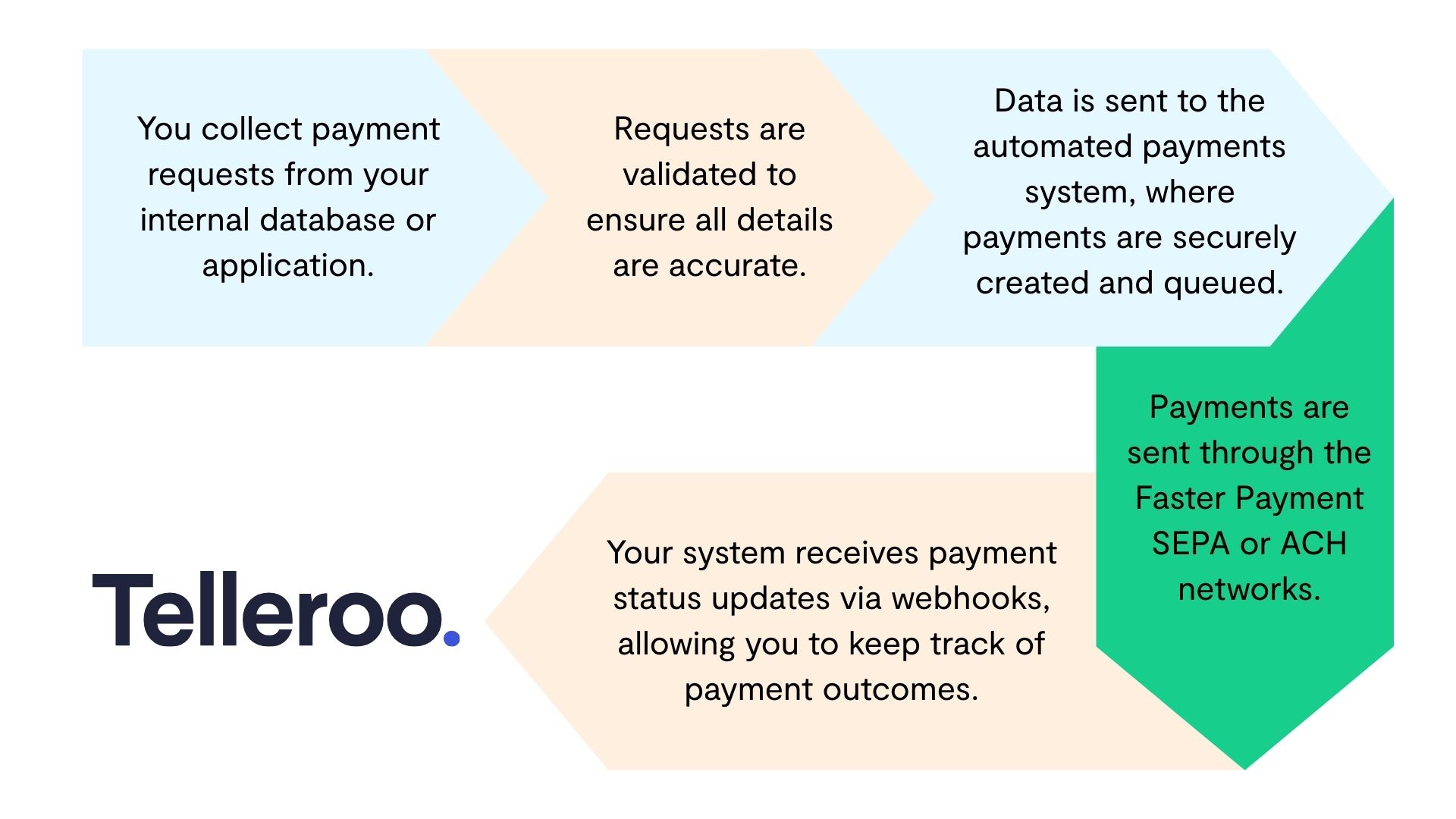
- You collect payment requests from your internal database or application.
- These payment requests are validated to ensure all necessary details, like recipient account information and amounts, are accurate.
- The validated data is sent to the automated payments system for processing, where payments are securely created and queued.
- The payment system executes the payments through the Faster Payment SEPA or ACH networks, ensuring that recipients receive funds in real-time or within a few hours.
- Your system receives payment status updates via webhooks, allowing you to keep track of payment outcomes.
Configure your API tokens
Automated payment systems will have different setups and steps to follow. However, most APIs have some commonalities, like tokens. We'll use the Telleroo API as an example.
API tokens are unique identifiers used to authenticate requests to the API, ensuring secure access to your account. These tokens should be treated like passwords and stored securely to prevent unauthorised access.
When creating an API token, you can usually assign it specific permissions. These permissions define what actions the token is allowed to perform within the automated payment system.
For example, Telleroo has 3 token permissions available:
- Create Transactions creates individual payments in Telleroo that need approval.
- Approve Transactions approves the individual payments that have been created in Telleroo.
- Create Recipients stores the payee name and bank details as a recipient in Telleroo, creating a recipient ID. You can use this recipient ID instead of bank details to create future payments to that payee.
Decide which actions you want your tokens to take and how many you'll need. Add them to your software so you can start sending payment information to the automated payments system.
Configure your API webhooks
A webhook sends automated notifications to a specific URL when certain events happen. This real-time push of information makes webhooks both efficient and timely.
Your automated payments system should allow you to set up API webhooks so that you know when key events happen in the payment process.
For example, Telleroo has three API webhooks available:
- Sent Webhook notifies you when a payment has been successfully sent to the recipient.
- Credit Webhook notifies you when funds have been added to the Telleroo account.
- Error Webhook notifies you when a payment was not sent due to an error.
Decide where you'd like to send API webhooks from your automated payments system, and how they'll be used to inform your process. For example, if a payment hits an unexpected error, what would you like to happen next? For example, you could automate sending a message to your team to investigate.
Test sending payment information
The way you get payment information ready to send to your automated payments system via an API will depend on your business and the software you use.
However, it’s always best to consult the system's API documentation to ensure you’re sending information in the correct format.
When you're ready, test sending payment information to the system, and run a complete test of your automatic payment processing.
🚀 Automate payments with Telleroo's Faster Payments API. Send payments 24/7, even on bank holidays, with full control over approvals, funding, and monitoring. 🚀
.webp)




'%3e%3cg id='Final-Copy-2_2_' transform='translate(1275.000000, 200.000000)'%3e%3cpath class='st0' d='M7.4,12.8h6.8l3.1-11.6H7.4C4.2,1.2,1.6,3.8,1.6,7S4.2,12.8,7.4,12.8z'/%3e%3c/g%3e%3c/g%3e%3c/g%3e%3cg id='final---dec.11-2020'%3e%3cg id='_x30_208-our-toggle' transform='translate(-1275.000000, -200.000000)'%3e%3cg id='Final-Copy-2' transform='translate(1275.000000, 200.000000)'%3e%3cpath class='st1' d='M22.6,0H7.4c-3.9,0-7,3.1-7,7s3.1,7,7,7h15.2c3.9,0,7-3.1,7-7S26.4,0,22.6,0z M1.6,7c0-3.2,2.6-5.8,5.8-5.8 h9.9l-3.1,11.6H7.4C4.2,12.8,1.6,10.2,1.6,7z'/%3e%3cpath id='x' class='st2' d='M24.6,4c0.2,0.2,0.2,0.6,0,0.8l0,0L22.5,7l2.2,2.2c0.2,0.2,0.2,0.6,0,0.8c-0.2,0.2-0.6,0.2-0.8,0 l0,0l-2.2-2.2L19.5,10c-0.2,0.2-0.6,0.2-0.8,0c-0.2-0.2-0.2-0.6,0-0.8l0,0L20.8,7l-2.2-2.2c-0.2-0.2-0.2-0.6,0-0.8 c0.2-0.2,0.6-0.2,0.8,0l0,0l2.2,2.2L23.8,4C24,3.8,24.4,3.8,24.6,4z'/%3e%3cpath id='y' class='st3' d='M12.7,4.1c0.2,0.2,0.3,0.6,0.1,0.8l0,0L8.6,9.8C8.5,9.9,8.4,10,8.3,10c-0.2,0.1-0.5,0.1-0.7-0.1l0,0 L5.4,7.7c-0.2-0.2-0.2-0.6,0-0.8c0.2-0.2,0.6-0.2,0.8,0l0,0L8,8.6l3.8-4.5C12,3.9,12.4,3.9,12.7,4.1z'/%3e%3c/g%3e%3c/g%3e%3c/g%3e%3c/g%3e%3c/svg%3e) Manage Cookies
Manage Cookies